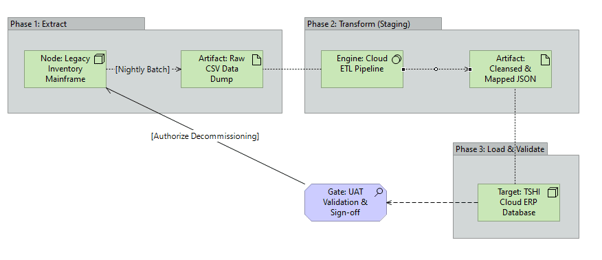
What it shows:
A phased, chronological map detailing how legacy information is Extracted, Transformed, and Loaded (ETL) into the target environment. It specifically highlights the intermediate holding states (e.g., backup files), the transformation engines used, and the final validation gates (e.g., User Acceptance Testing) required before legacy decommissioning.
Why it’s needed:
Risk mitigation and outage planning. Migrating legacy data is often the highest-risk project activity. This diagram proves to the data owners that critical assets will not be corrupted during the move. For Project Managers, it provides the exact technical sequence required to plan the inevitable downtime window.
When to use it:
Highly recommended for SADs and HLDs whenever replacing an existing system or performing a major version upgrade where the vendor fundamentally changes the underlying database schema.
When NOT to use it:
Generally best to omit for “Greenfield” deployments (brand new capabilities where no legacy data exists). It should also be skipped for pure block-level storage migrations (e.g., a pure SAN-to-SAN replication) where the application layer and logical data schema are completely unaware that the physical disks have changed.
Example: