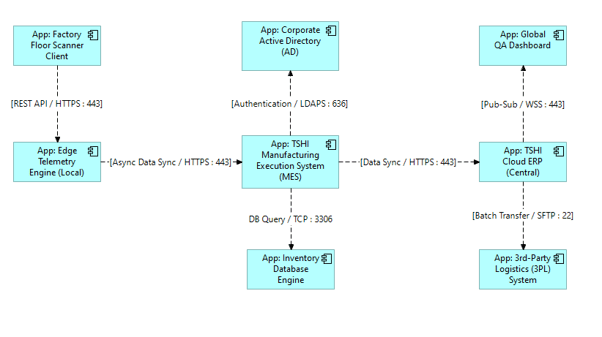
What it shows:
A logical map of the software components (clients, middle-tier servers, backend databases, external services) and the exact communication pathways between them. It explicitly details the protocols (e.g., HTTPS, LDAPS, TCP) and port numbers required for the distinct software nodes to interact.
Why it’s needed:
Firewall justification and cross-vendor delivery. Since the delivery team rarely controls the customer’s core network, this diagram serves as the exact blueprint handed over to central IT or network security partners to request firewall rule changes. It removes ambiguity and prevents the classic “the application is broken” versus “the firewall is blocking it” blame game during deployment.
When to use it:
Highly recommended for Solution Architecture Documents (SAD) and High-Level Designs (HLD) for almost every enterprise deployment (both COTS and Custom Dev). If the software spans multiple servers, crosses network security zones, or integrates with central enterprise services (like Active Directory or Splunk), this diagram is required to secure network team sign-off.
When NOT to use it:
Generally best to omit for standalone, local desktop installations that do not communicate over a network. It should also be skipped in high-level executive summaries where port-level details will overwhelm the business stakeholders.
Example: